
Executive summary
Advanced driver assistance systems (ADAS) have changed what it means to finish a collision repair. A vehicle can look perfect leaving the bay and still have a camera, radar or sensor that will not perform the way the driver, the shop and the insurer all assume it will. Identifying every calibration a repair requires, and proving it was done to OEM specification, has become one of the highest-stakes steps in the repair process.
Most shops and calibration providers rely on software to check estimates against OEM procedures. In our own experience, the tool we used for years delivered real-world accuracy of roughly 70 percent. In work where a miss can mean a safety failure, a liability claim or a damaged reputation, a 30 percent margin for error is not acceptable.
ADAS Assist was built by collision and calibration professionals to close that gap. It combines two systems designed to work together:
- The ADAS Verification System (AVS), a quoting and scrubbing engine that reads a body shop estimate, identifies the required calibrations and related operations, and quotes automatically only where it has reached 90 percent accuracy for that manufacturer. Anything below that bar is quoted by an ADAS Assist employee. Every result links directly to the governing OEM procedure.
- The Calibration Management System (CMS), which runs the business around the calibration: pricing, technicians, a daily technician calendar, job scheduling and invoicing in one place.
The problem: a correct repair is no longer enough
Modern vehicles rely on a network of cameras, radar units and sensors to support features such as adaptive cruise control, lane keeping, automatic emergency braking and surround-view cameras. Many of these components are mounted in exactly the places a collision affects: bumpers, grilles, windshields, mirrors and quarter panels. Even repairs that never touch a sensor directly, such as a wheel alignment or a suspension repair, can require a calibration under OEM procedures.
That creates a translation problem. A collision estimate is written in terms of parts and labor operations. OEM repair information is written in terms of procedures, conditions and triggers. Someone has to connect the two, line by line, for every vehicle, and the answer differs by make, model, year and equipment.
The cost of getting it wrong
- Safety. A system that is out of calibration may not warn, brake or steer when the driver expects it to.
- Liability. When something goes wrong, the shop and the calibration provider must be able to show what was required and that it was performed.
- Comebacks and cycle time. A missed calibration discovered late means a vehicle returning to the shop, a delayed delivery and an unhappy customer.
- Revenue and documentation. Required operations that never make it onto the estimate are work performed without support, or work not performed at all.
Accuracy is not a nice-to-have
A vehicle either has its ADAS calibrated to OEM specification, or it goes back on the road with a system that will not perform as everyone assumes. In this work, accuracy is the entire job.
Why existing tools fall short
Before building ADAS Assist, our team relied on a third-party scrubbing tool to check calibration work against OEM procedures before it went out the door. It held together, but not well enough. Real-world accuracy hovered around 70 percent, which meant our own people had to catch the misses, and the tool's output could not be trusted on its own.
When we looked at what else was available, we found the same pattern. The tools were built by software teams who had never stood in a bay trying to match a scan report to the right OEM procedure at 5 p.m. on a Friday. They could produce an answer, but they did not reflect how the work actually flows, where the shortcuts and blind spots are, or what a technician and estimator need to see to stand behind the result.
Two shortcomings stood out:
- Accuracy that could not carry liability. A tool that is right most of the time still leaves the shop holding the risk for the rest.
- Answers without the reasoning. A list of calibrations with no direct path to the OEM procedure behind each one forces technicians and estimators to repeat the research the tool was supposed to do.
On top of that, calibration businesses were left running scheduling, technician management, pricing and billing in separate software, re-keying the same job information in multiple places.
The ADAS Assist approach
ADAS Assist was not designed by developers guessing at what a calibration company needs. It was built by people who have run shops, managed technicians and answered for a missed calibration when a comeback walked through the door. Every part of the platform exists because we needed it ourselves first.
The platform is built on three principles:
- A high accuracy bar. Each manufacturer is tested independently, and quoting is automated only once it reaches 90 percent accuracy. Below that bar, an ADAS Assist employee builds the quote.
- Full traceability. Every required operation is tied to the estimate line that triggered it and linked to the OEM procedure that governs it.
- One connected workflow. Verification and business operations are built to work together, not as two separate tools stapled to one login.
The ADAS Verification System (AVS)
AVS is a standalone quoting and scrubbing engine. It takes a body shop estimate in and returns a verified, documented statement of the calibrations and related operations the repair requires.
How it works
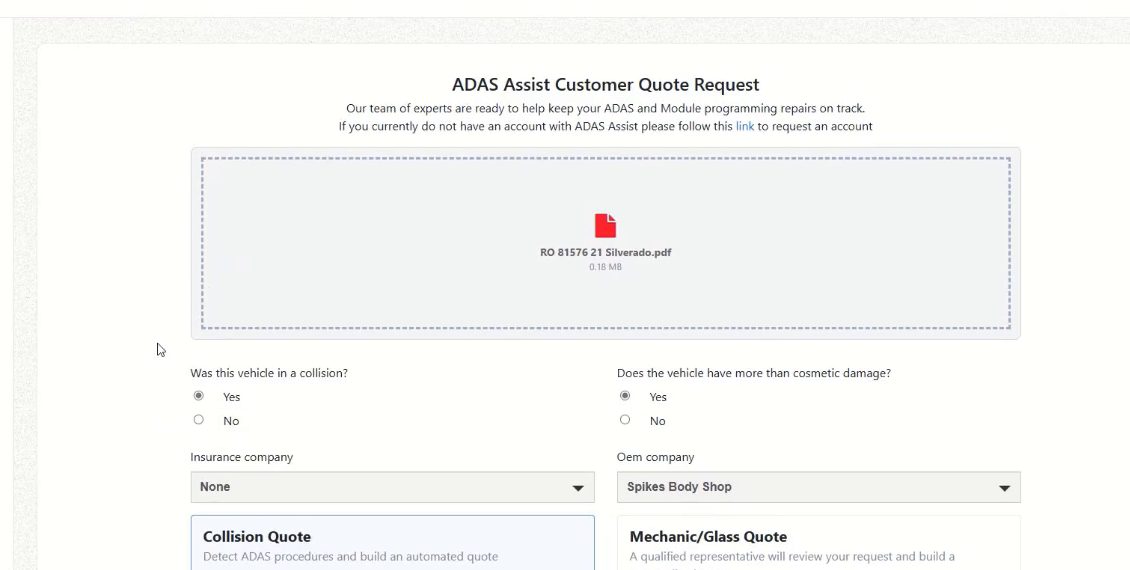
- Submit the estimate. The shop uploads its estimate (for example, a PDF from its estimating system) through the ADAS Assist customer quote request.
- Add the context. The shop answers a few key questions, including whether the vehicle was in a collision and whether it has more than cosmetic damage, and selects the insurance company and quote type (collision, or mechanical/glass).
- AVS verifies. The engine reads the estimate, identifies the vehicle and maps each repair line against OEM procedures. Quoting is automated only where AVS has reached 90 percent accuracy for that manufacturer. Anything below that bar, an ADAS Assist employee builds the quote.
- Review the quote. The shop receives quote details for the VIN, listing each required operation along with the estimate line or answer that triggered it.
- Access the procedures. Each operation links directly to the governing OEM documentation, so the technician or estimator can see exactly what the calibration requires and why.
- Invoice. Once the work is complete, the final invoice is generated from the same record.
Every result shows its work
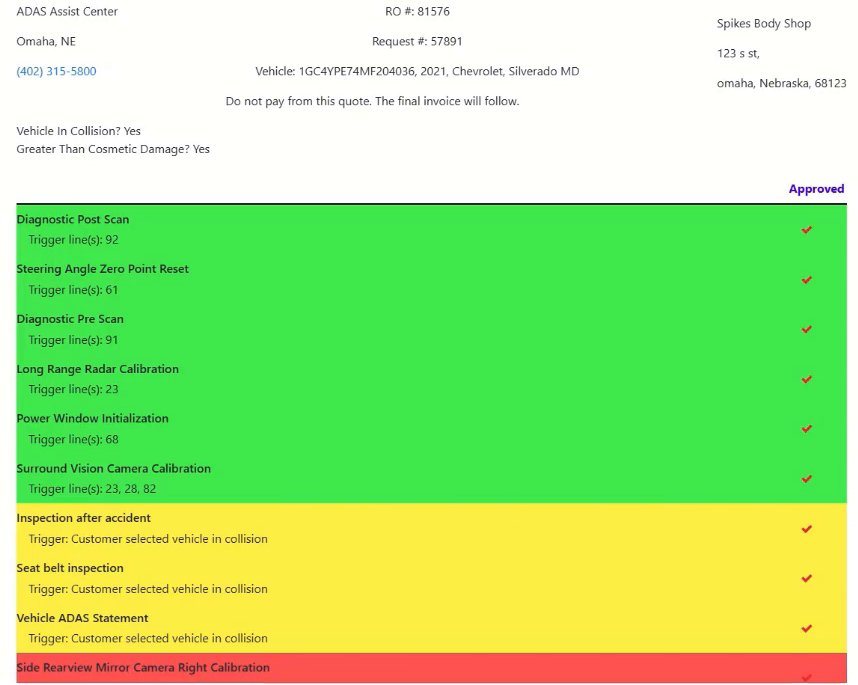
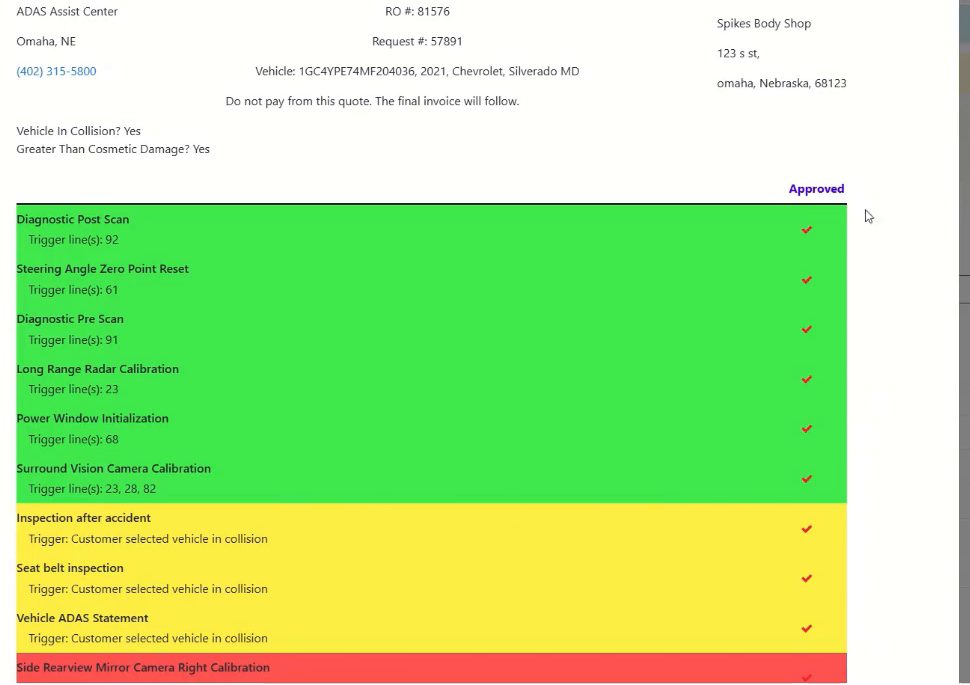
Rather than handing back a bare list, AVS shows why each operation is on the quote. In the example below, drawn from a demonstration request for a 2021 Chevrolet Silverado, operations such as the diagnostic pre- and post-scans, steering angle zero point reset, long range radar calibration, power window initialization and surround vision camera calibration are each tied to specific trigger lines on the estimate. Operations required because the vehicle was in a collision, such as post-accident and seat belt inspections and a vehicle ADAS statement, are identified separately with that trigger noted. Color coding makes the different categories easy to scan at a glance.
Direct access to OEM procedures
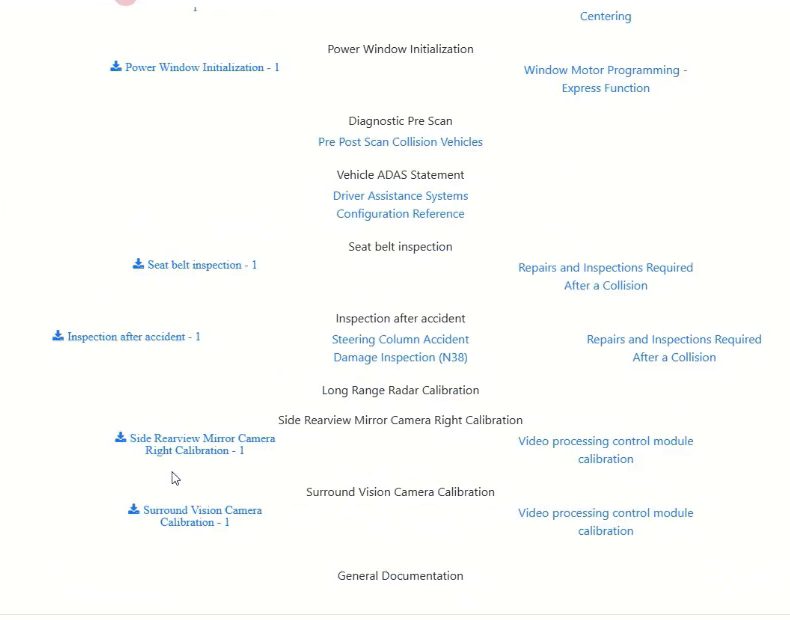
The documents view connects each operation to its governing OEM procedure, from scan requirements to camera and radar calibration and post-collision inspections. The technician performing the work and the estimator defending it both see the same source material, which closes the gap between what the software says and what the OEM requires.
The Calibration Management System (CMS)
Accuracy solves the liability problem, but running a calibration business takes more than a correct answer on a scan report. The CMS is built to run the entire operation from one place, using the same job records AVS creates.
- Pricing. Set your own pricing for the operations you perform.
- Technician management. Manage your technicians and team members in one system.
- Daily technician calendar. Always know who is where and what they are calibrating.
- Scheduling. Schedule jobs directly from verified requests.
- Invoicing and billing history. Generate invoices without switching to a second piece of software.
Body shop customers get their own portal to send requests, track open and closed requests, manage their team and review billing history.
Built to work together
AVS and CMS share one workflow because that is how the work actually flows in a real shop: estimate in, verified calibrations out, technician scheduled, job invoiced.
How ADAS Assist compares
| Generic scrubbing tool | ADAS Assist (AVS + CMS) | |
|---|---|---|
| Built by | Software developers outside the industry | Collision and calibration professionals |
| Accuracy | Real-world accuracy around 70 percent | Each manufacturer tested independently. Automated only at 90 percent accuracy; below that, an ADAS Assist employee builds the quote |
| Procedure support | Result without the reasoning behind it | Each result linked to the governing OEM procedure |
| Traceability | Limited | Every operation tied to the estimate line or answer that triggered it |
| Business operations | Separate software required | Built-in pricing, technicians, calendar, scheduling, invoicing |
Who benefits
Calibration providers
Quote with confidence, back every operation with the OEM procedure, and run technicians, scheduling and billing from the same system.
Collision repair shops
Submit an estimate and get a clear, documented list of required calibrations and related operations, with the reasoning attached. Fewer missed operations means fewer comebacks and a stronger position when standing behind the repair.
Vehicle owners
The ultimate beneficiary is the driver, who gets back a vehicle whose safety systems have been identified, calibrated and documented to OEM specification.
Conclusion
ADAS has raised the stakes of every collision repair, and the tools the industry has relied on have not kept pace. A 70 percent accuracy rate leaves too much risk with the shop and the calibration provider, and answers without the OEM procedure behind them leave too much work for the people in the bay.
ADAS Assist was born out of frustration with a system that was not accurate enough for work where accuracy is everything. It was built by the people who understood exactly what better looked like: a verification engine that is not trusted to quote a manufacturer on its own until it reaches 90 percent accuracy, ties every operation to its OEM procedure, and connects directly to the system that runs the business.
ADAS Assist. Because accuracy isn't optional, it's essential.